The Best MagSafe Wireless Charger Setup for a Cluttered Desk (2025 Pick)
Most MagSafe pads leave the rest of your desk a cable mess. Our pick for a MagSafe wireless charger solves a bigger problem than just your phone.


Most MagSafe chargers solve exactly one problem and create three new ones. You snap your phone down, then still need bricks and cables for the laptop, the earbuds, the tablet, and whatever else lives on your desk. Looking across the category, our pick is the 160W Multi-Port USB-C Desktop Charger with Wireless Fast Charging — a single unit that handles the magnetic phone pad and everything else.
Our pick: 160W Multi-Port USB-C Desktop Charger with Wireless Fast Charging
Most MagSafe-style pads on the market are one-trick: a puck, a cable, and that’s it. This one folds the wireless pad into a 160W multi-port desktop hub, which is a more honest answer to what people actually want when they search for a MagSafe charger — a clean desk, not just a floating phone.
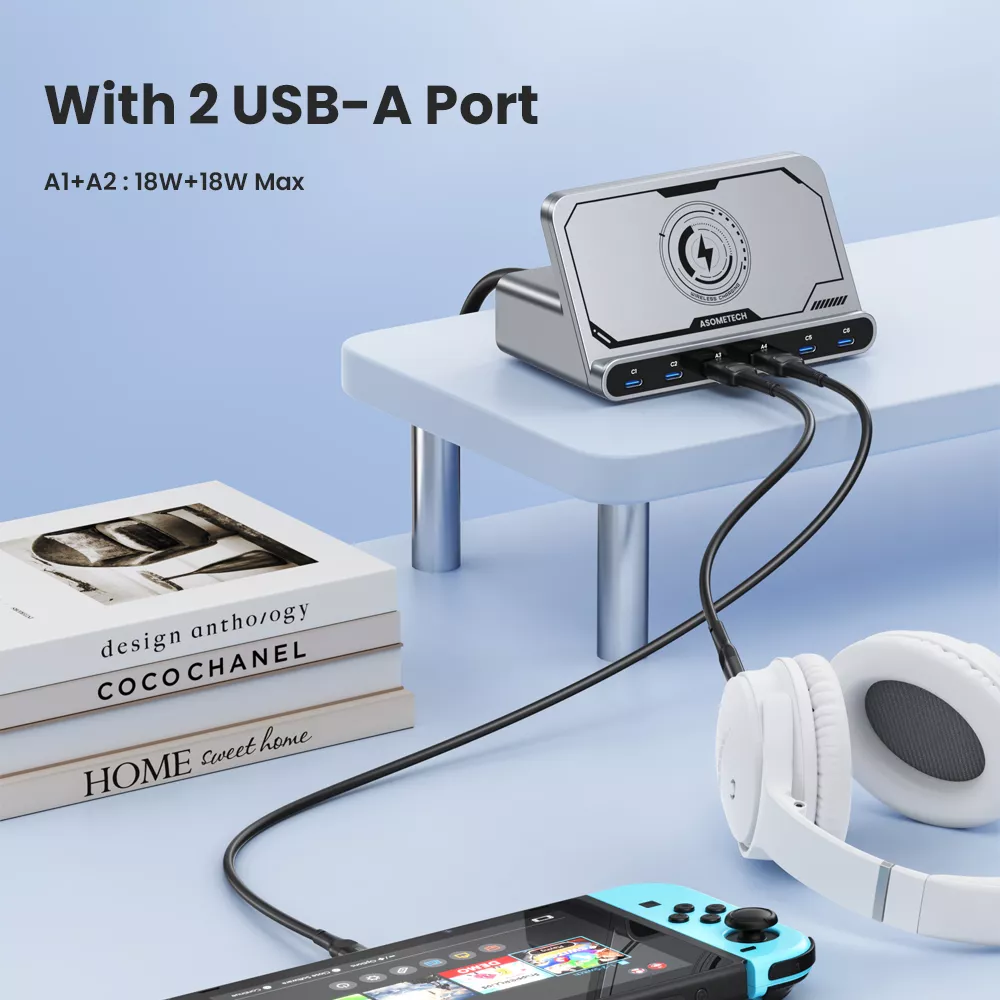
At $46.51 (listed as 50% off the $93.11 MSRP), the price is where this pick gets interesting. A standalone Apple MagSafe puck runs around $39 on its own — and doesn’t include the 20W brick you need to hit fast-charge speeds. Here you get the magnetic wireless pad plus a 160W multi-port charger in one footprint. The listing shows six product photos covering the ports and layout; check the source listing for the exact port breakdown and confirmed wattage per port before you commit.
Compared to other multi-port desktop chargers in this price range, bundling the wireless pad is the differentiator. Most competitors make you buy the wall brick and the MagSafe puck separately.
Who should buy it
This is for the person whose desk has turned into a cable graveyard. If you own a MacBook (or any USB-C laptop), an iPhone, AirPods, and maybe an iPad or Kindle, you’re currently juggling three or four wall warts. A 160W hub with a built-in magnetic pad collapses that down to one plug in the wall.
It’s also a strong pick for anyone setting up a new home office, a dorm, or a hotel-friendly travel kit where outlet real estate is scarce. And if you’ve been eyeing an Apple MagSafe puck plus a separate GaN charger, this bundle is likely cheaper than buying both — verify the current pricing on the source listing.
Who should skip it
Skip it if you only need a bedside phone pad. Paying for 160W of USB-C output you’ll never use is silly when a $20 stand does the job. Same story if you’re deep in the Android ecosystem — you’ll get standard Qi wireless charging, but not the magnetic snap-alignment that makes MagSafe worth it in the first place (Android phones without magnet rings just sit on the pad like any other Qi charger).
And if you specifically need Apple-certified MagSafe at the full 15W with the official handshake, confirm the wireless spec on the source listing — many “MagSafe-compatible” chargers deliver 7.5W Qi with magnets, which is different.
What to know before buying
A few practical notes before you order:
- Verify the wireless wattage. The listing describes “wireless fast charging” but we couldn’t independently confirm whether it’s true 15W MagSafe or 7.5W Qi with magnets. Check the source listing’s spec sheet.
- Port mix matters. 160W total is generous, but how it splits across ports determines whether you can fast-charge a 16” MacBook Pro and the phone simultaneously. The product photos show the port layout — count them before assuming.
- Cable not always included. Desktop chargers of this class sometimes ship without the USB-C-to-MagSafe or laptop cable you’d need. Confirm what’s in the box on the source page.
- Shipping and returns. Check the source listing for current shipping timelines and return details before ordering — they vary by region.
- Desk footprint. A 160W GaN hub is bigger than a puck. If your desk is tiny, measure first.
Alternatives
If you truly only want the magnetic puck experience with no extra ports, Apple’s own MagSafe charger or Belkin’s BoostCharge Pro are the safe defaults — both cost less upfront but do less. For heavy travelers, a folding 3-in-1 stand (phone + watch + earbuds) may serve better than a desktop hub. And if you’re a PC gamer with a wired keyboard, mouse, and headset already eating your ports, a dedicated wireless stand plus a separate USB hub might make more sense than combining them.
For the search that brought you here — a MagSafe wireless charger that actually improves your desk instead of adding to the pile — the 160W Multi-Port USB-C Desktop Charger is the pick. Confirm the wireless spec and port layout on the source listing, and if the numbers match what you need, it’s hard to beat at this price.
Our pick for MagSafe Wireless Charger Setup for a Cluttered Desk (2025 Pick).
Check the source listing for current shipping and return details.
Frequently asked
Is this a true MagSafe charger or just Qi with magnets?
The listing describes it as wireless fast charging with magnetic alignment, but we couldn't independently confirm whether it delivers full 15W MFi MagSafe or 7.5W Qi with magnets. Check the source listing's spec sheet before buying if that distinction matters to you.
Can it charge a MacBook Pro and my iPhone at the same time?
At 160W total output across multiple USB-C ports plus the wireless pad, it's built for exactly that scenario. Confirm the per-port wattage split on the source listing — most 16" MacBook Pros pull up to 96W, which still leaves headroom for the phone and accessories.
Will it work with an Android phone?
Yes for standard Qi wireless charging, but Android phones without a built-in magnet ring won't snap to the pad the way an iPhone 12 or later does. You'll get wireless charging, just not the magnetic alignment benefit.
Does it come with the cables I need?
That varies. Desktop chargers of this class sometimes include a power cord only, leaving you to supply USB-C cables for your devices. Check the source listing's "what's in the box" section before ordering.
Is $46.51 a good price for a MagSafe-style charger?
A standalone Apple MagSafe puck runs around $39 and doesn't include a 20W wall brick. Getting a 160W multi-port hub with the wireless pad included at $46.51 is competitive if the wireless spec meets your needs — verify current pricing on the source listing.